
Every website on our server gets an encryption certificate as part of the yearly hosting. This alone is a $50 saving because you host with me.
However, we want to make your site super secure, so we want to install this plugin.
Really Simple SSL automatically detects your settings and configures your website to run over HTTPS. To keep it lightweight, we kept the options to a minimum. Your website will move to SSL with one click.
Installing
In the WordPress Dashboard, click: Plugins -> Add New.
On the left of your screen, in ‘Search plugins…’ type HTTPS.
This is the best term to search on, even if it is not the title of the plugin.
You should now see the Plugin as shown above in this lesson’s header picture by Rogier Lankhorst, Mark Wolters.
Click on ‘Install Now‘.
Once installed, click on ‘Activate‘.
Setting Up
Activating should take you to Settings -> SSL.
Change Settings lo look like this: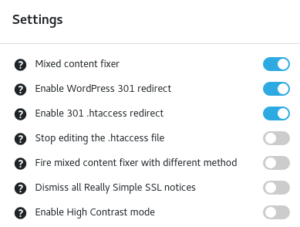
Now click save at the bottom of settings.
Under Your Progress just close all the notifications. You do not need to do anything with them.
Tips & Tricks might be something you want to read, but there is nothing more you need to do with this plugin.